
The art of the possible with Copilot for pressure systems documentation
IMechE Lifecycle of Pressure Systems 202628 October 2026One Birdcage Walk, LondonAli Parandeh CEng
Copilot can already save engineers time on pressure systems paperwork: examination reports, written schemes, procedures and registers. It gets far less reliable on drawings and scans, which is where most of the engineering detail sits. And whatever the tool, the competent person still signs. This talk sets out what works today, where it breaks, what has to be built instead and where AI has to stop.
Get the slides, cheat sheet and test packWhat's in the pack
The slides
All 20 slides with sources, including the P&ID test, the five-layer build order, the decision ladder and the Content–Consequence Matrix.
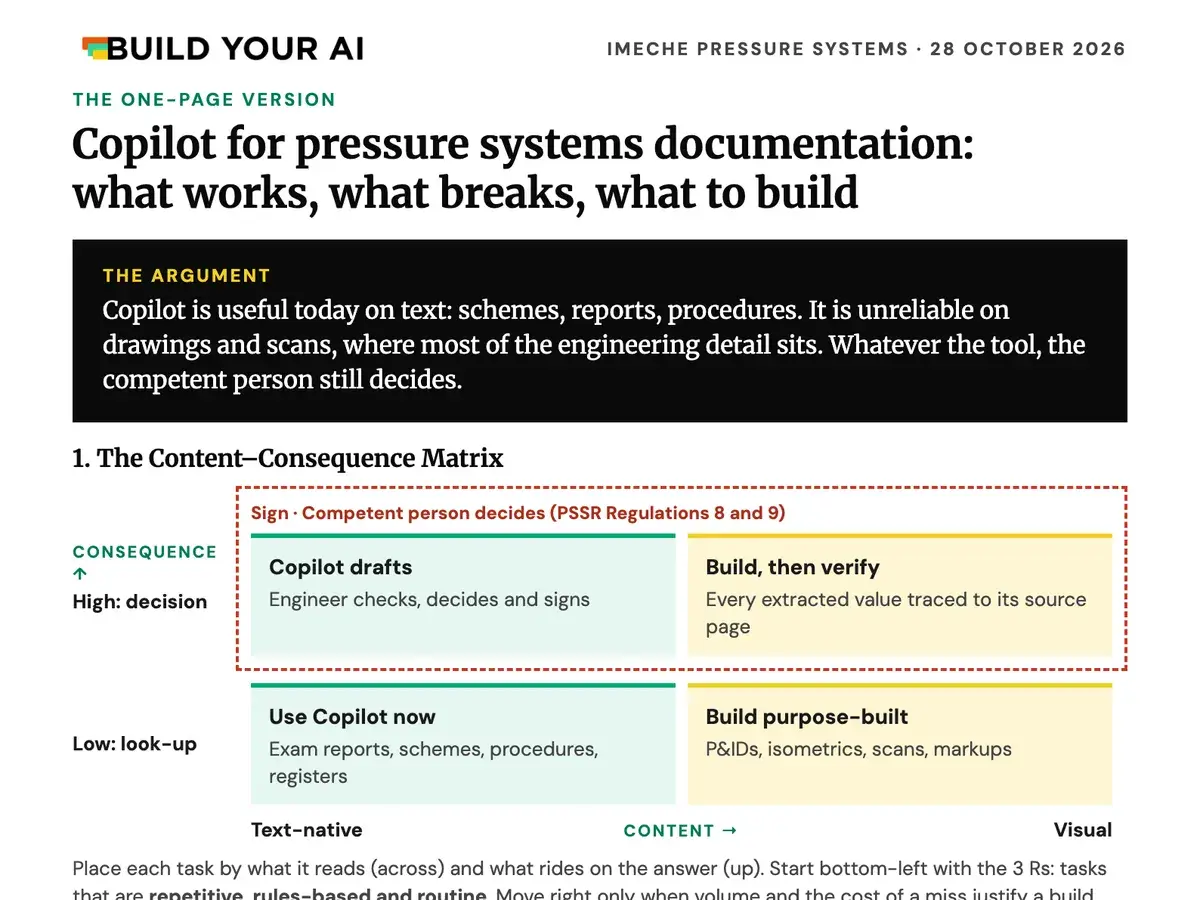
The cheat sheet
Four A4 pages: the one-page version with the five prompts, where Copilot breaks, what to build and who decides, and a next step if you want help.
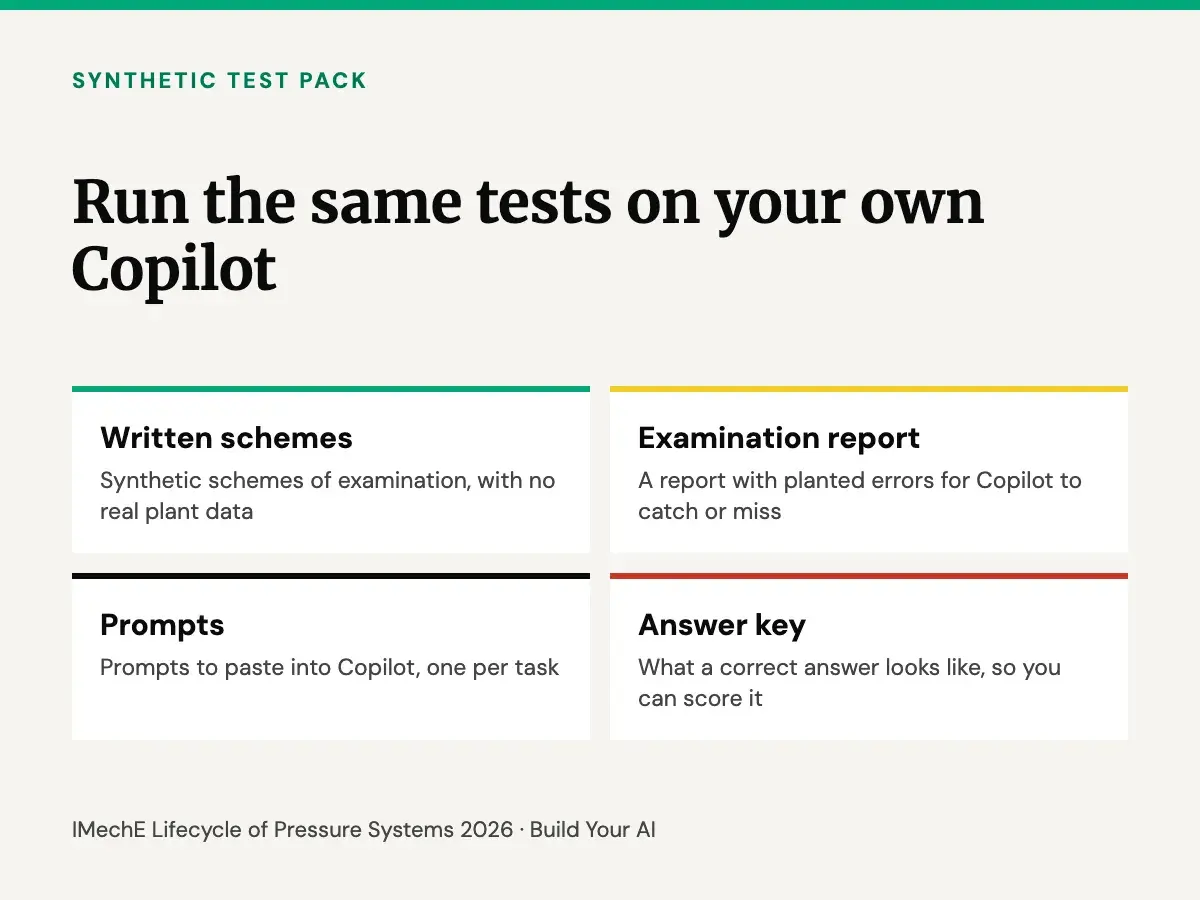
The synthetic test pack
Synthetic written schemes, an examination report with planted errors, prompts and an answer key. Run it on your own Copilot before you trust it with real records.
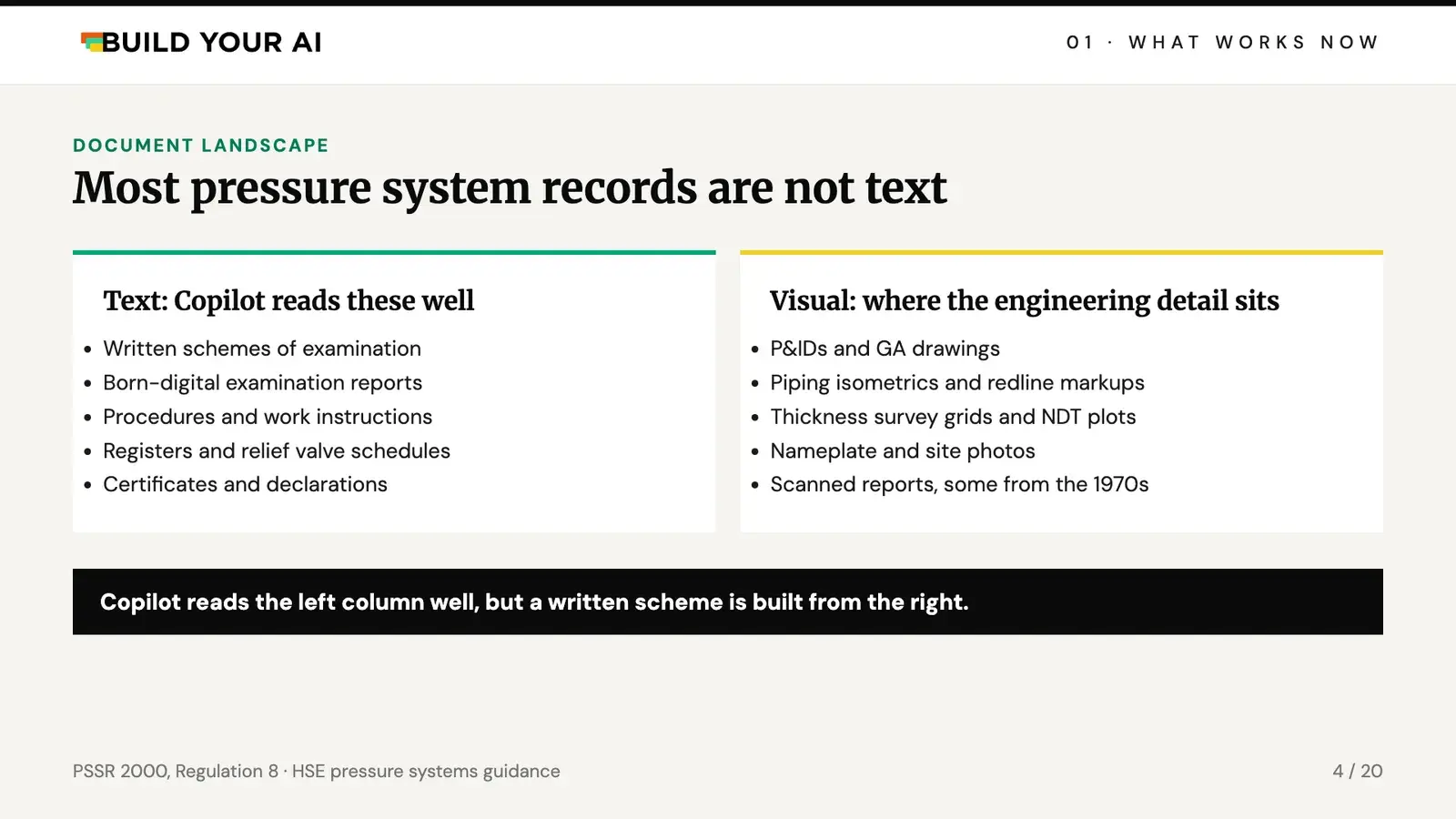
Most pressure systems records are not text
Look at the paper trail behind one pressure system. Written schemes of examination, born-digital examination reports, procedures, registers, relief valve schedules and certificates are text, and Copilot reads them well.
The engineering detail sits somewhere else: P&IDs and GA drawings, piping isometrics and redline markups, thickness survey grids and NDT plots, nameplate photos and scanned reports, some from the 1970s. Under PSSR, the written scheme names the parts to examine, the nature of the examination and the maximum interval. Most of what goes into it comes from that second pile.
Five prompts that work on text documents now
None of these needs a project or a budget. Each one comes with a check, because the output is text and an engineer can verify it against the source in seconds.
- Findings to actions. “List every finding in this examination report as a table: tag, category, action, due date, page.” Check the page citations match.
- Due-date check. “Check the next examination dates in this report against the current written scheme. Flag any mismatch.” Check which scheme revision it used.
- Revision compare. “Compare these two scheme revisions. List every changed interval or limit.” Tables can drop out, so check those by hand.
- Find the procedure. “Which of our procedures covers relief valve testing? Cite the document.” Only as good as your library is current.
- Draft the cover note. “Draft a note to the plant manager summarising the Category A and B actions.” The engineer edits it and sends it.
They work best on born-digital documents stored in SharePoint. WSP reports that 84% of surveyed Microsoft 365 Copilot users say it saves them time every day. That's a self-reported survey, so it tells you people like it, not that it's accurate on engineering documents.
Why it goes unused
Out of reach. Schemes and reports often sit in an EDMS or on shared drives that Copilot can't reach. Good prompts and agents stay with the people who built them.
Images not indexed. By default, text inside drawings and scanned images isn't searchable in SharePoint, so Copilot can't find it. Microsoft's SharePoint OCR fixes that, but IT has to switch it on, it's billed pay-as-you-go and it only scans files uploaded after it's enabled. Even then you get the words on a drawing, not what connects to what.
Silent gaps. In Copilot Studio, uploaded knowledge files marked Confidential or Highly Confidential, or protected with a password, return nothing. They can still sit in the knowledge list looking ready, so an agent can look healthy and be blind to half the library. In nuclear or defence that could be the whole document set, which raises the question to ask first: is this content allowed in Copilot at all?
Our test: one P&ID, upright and rotated
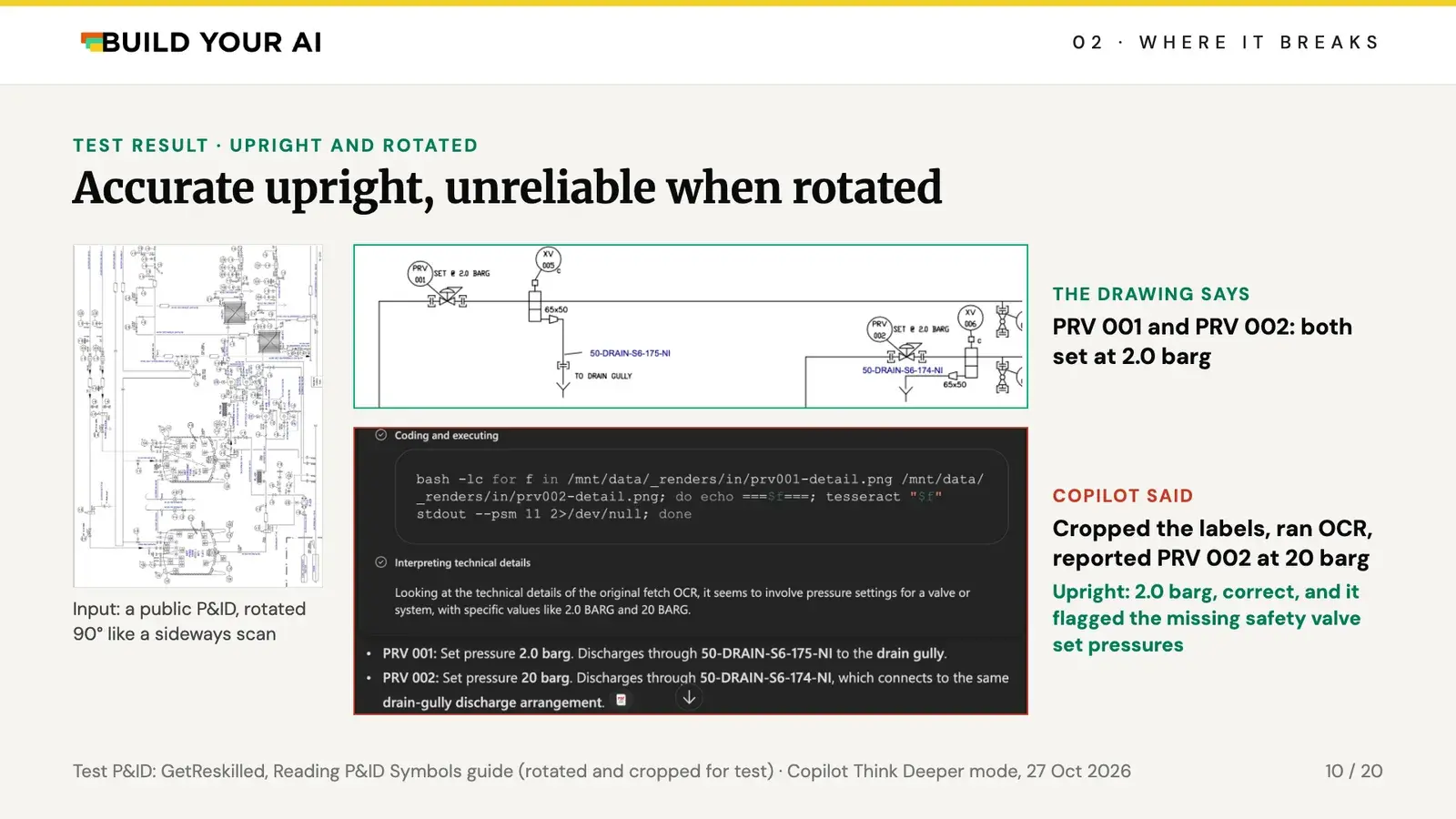
We took a public P&ID of a clean-in-place system with two steam-heated heat exchangers and asked Copilot for the relief valve set pressures. The drawing shows two pressure regulating valves, PRV 001 and PRV 002, both set at 2.0 barg. The safety valves on the exchangers have no set pressure shown, so a good answer says so.
Upright, Copilot got it right: 2.0 barg, and it pointed out that the safety valve set pressures weren't shown. Then we rotated the sheet 90 degrees, the way landscape drawings often come out of a scanner. In Think Deeper mode it wrote its own code, cropped the labels and ran them through an OCR engine. The OCR dropped the decimal point, and Copilot reported PRV 002 at 20 barg as fact. In Auto mode, on the same rotated drawing, it named a safety valve, PSV-003, that isn't on the sheet.
It was cautious where it knew it couldn't read and confident where it was wrong. The drawing is a public tutorial image and may have been seen in training, so treat the upright result as a best case.
Drawings aren't the only weak spot. Practitioners report agents losing context in multi-column grids, which is exactly what a thickness survey looks like. Copilot answers from whatever is indexed, superseded schemes included, with the same confidence. And Microsoft publishes no accuracy figure for technical documents, with no public benchmark on PD 5500, EN 13445 or ASME VIII. Anyone quoting you a code-compliance percentage is quoting their own test, so ask to see it.
Inputs matter more than the model
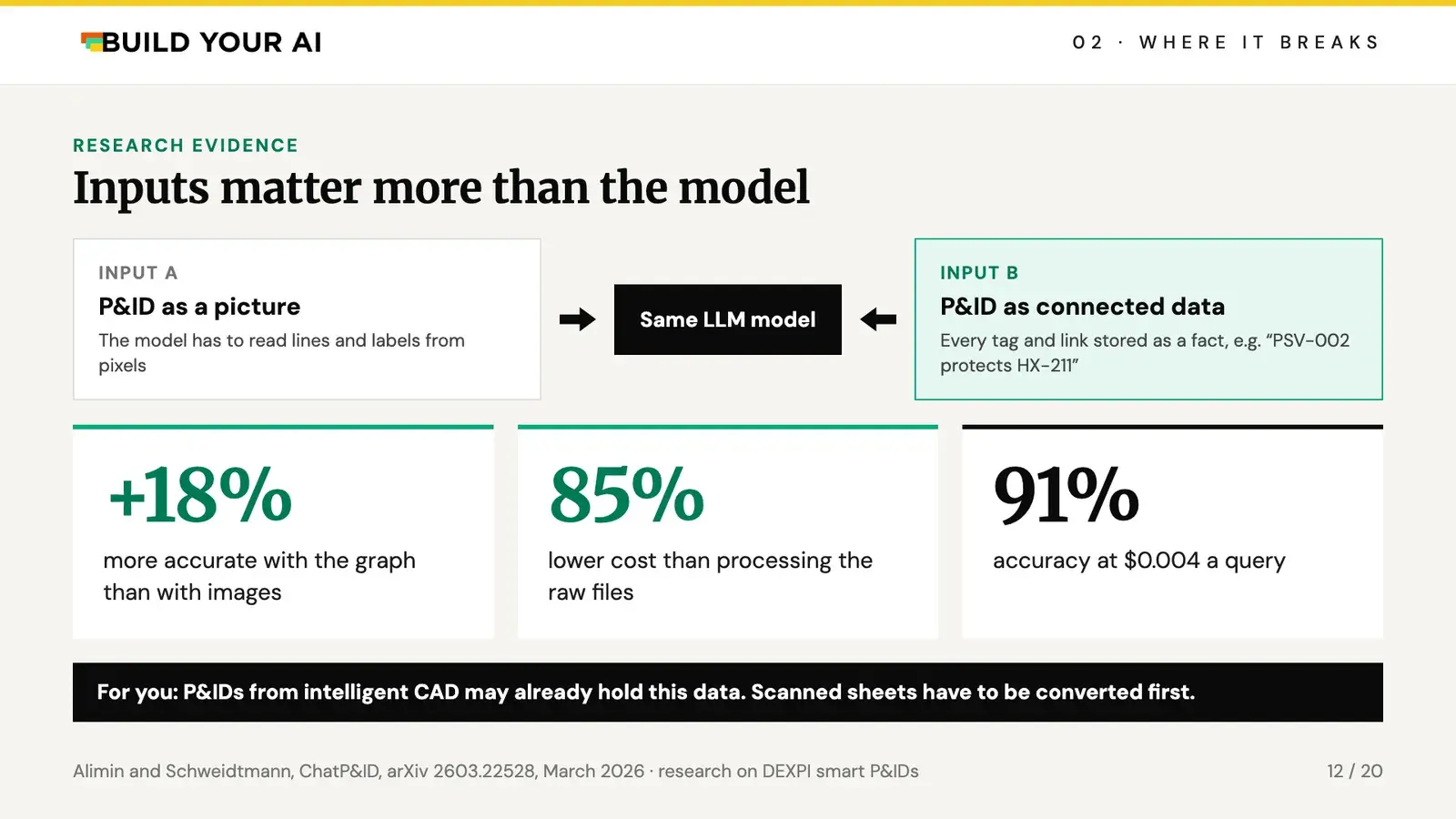
Research published in March 2026 gave the same language models two kinds of input: a P&ID as an image, and the same P&ID as a knowledge graph with every tag, line and connection stored as data. The graph version was 18% more accurate and cost 85% less than processing the raw files, reaching 91% accuracy at $0.004 a query.
The catch is that this was done on DEXPI smart P&IDs, which most UK sites don't have. P&IDs from intelligent CAD may already hold this data. Scanned sheets have to be converted first, and that's a project in its own right.
What has to be built instead: five layers
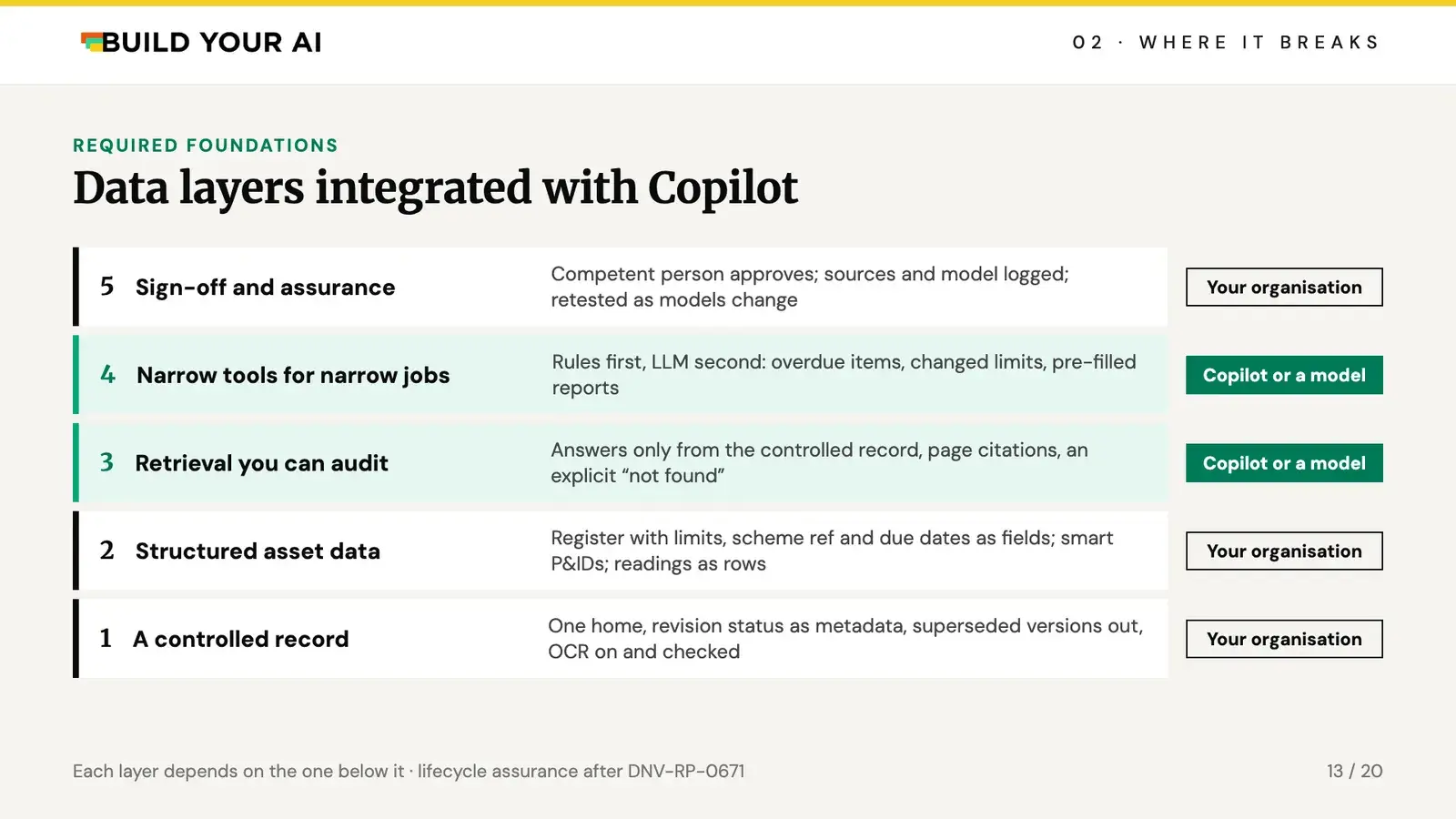
Read it from the bottom up, because that's the build order.
- A controlled record. One home for schemes, reports and drawings. Revision status as metadata, superseded versions out, OCR on and checked.
- Structured asset data. A register where design limits, scheme reference and due dates are fields, not paragraphs. Smart P&IDs rather than scans. Thickness readings as rows.
- Retrieval you can audit. Answers only from the controlled record, with page citations and an explicit “not found”. This is where to start.
- Narrow tools for narrow jobs. Rules first, model second: overdue items, changed limits, pre-filled reports.
- Sign-off and assurance. The competent person approves, the sources and model behind every draft are logged, and the tool is retested when the model changes. DNV-RP-0671 has a lifecycle method for this.
Three of the five layers are your organisation's work, not the vendor's. If your register and drawings are in poor shape, an AI project will show you within weeks, and fixing them usually costs more than the licence.
Build or buy: what the published cases have in common
Every credible case I found has the same three things: a narrow job, a controlled set of documents and an engineer who signs.
Mott MacDonald REALM extracts requirements from specifications and flags contradictions. The firm reports it as 35 to 45% faster in pilot. Sellafield, in PA Consulting's published case study, maps regulatory change to controlled documents with 90% less regulatory text to read. They tuned it to miss as few changes as possible and accepted more false alarms, because a miss costs far more. ChatP&ID is the research above. None of these figures has been independently audited.
Before building anything, ask three questions. How many documents are there, and how often do they change? How much of it is drawings, scans and markups? What happens if a value is wrong and nobody notices? For most organisations, the first two layers come before any build.
Where AI stops: the law has not changed
PSSR Regulation 8 requires a written scheme of examination, drawn up or certified as suitable by a competent person, before the system is used. Regulation 9 requires examination in line with the scheme by a competent person, with a written report. HSE's June 2026 policy statement on AI makes the point that the Health and Safety at Work Act is goal-setting and applies whatever technology you use. AI that affects health and safety needs a risk assessment and controls that reduce risk so far as is reasonably practicable. There's no ban and no special route for AI. The competent person's duty stands.
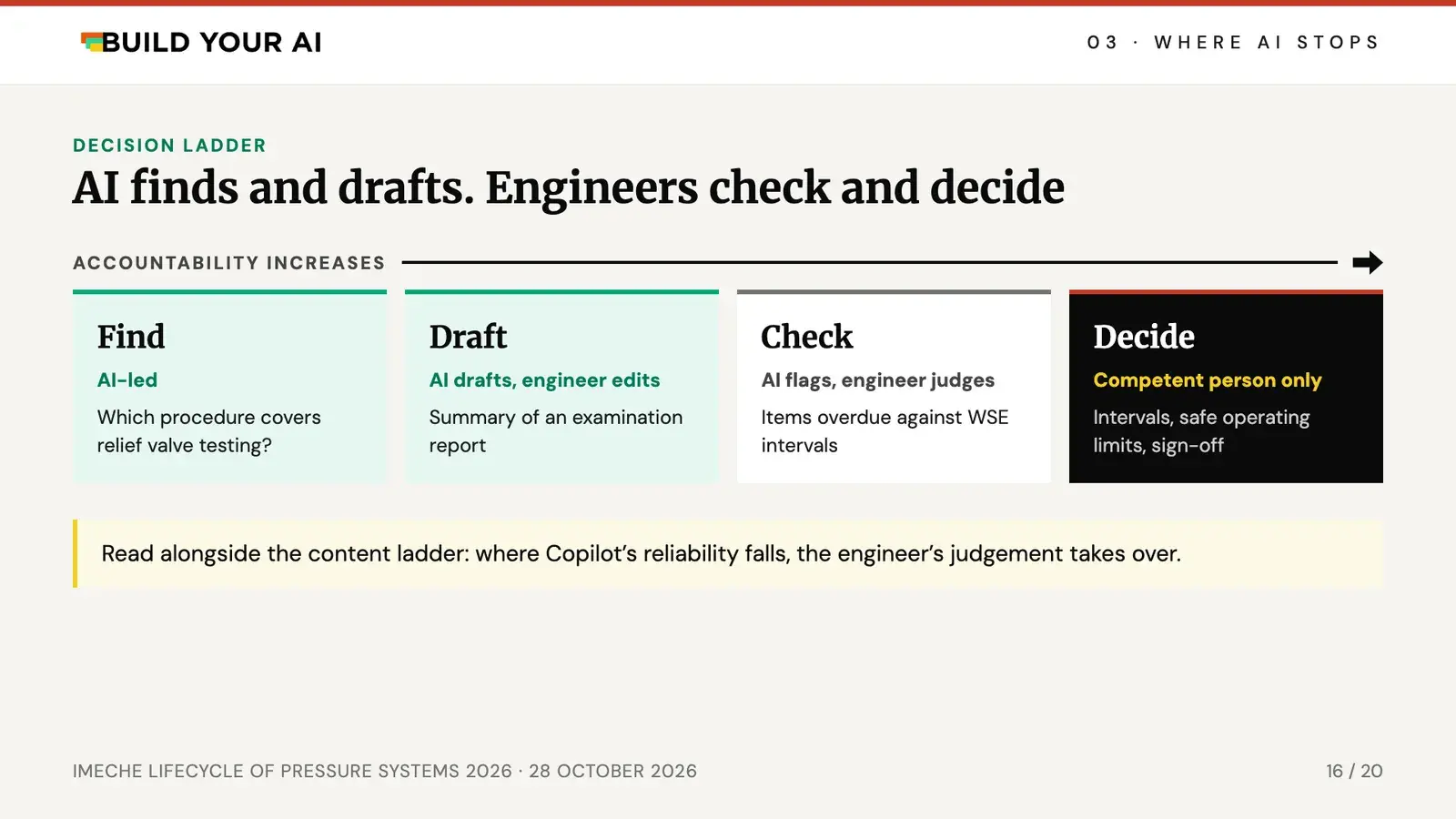
That gives a simple decision ladder. Find is AI-led: which procedure covers relief valve testing? Draft: AI drafts a summary of an examination report and the engineer edits it. Check: AI flags items overdue against the written scheme intervals and the engineer judges. Decide is for the competent person only: intervals, safe operating limits and the signature. The point where Copilot stops being reliable is the same point where the engineer has to take over.
Why sign-off stays a professional judgement
Even at 99% accuracy, the scheme still carries a named person's duty, and the 1% is theirs.
Fluent output is also harder to challenge. HSE's ThinkSHARP research is looking at cognitive offloading in AI-assisted safety decisions. The risk that worries me most is juniors who learn the job by accepting drafts. They're the people signing schemes in ten years.
The Engineering Council and Royal Academy of Engineering revised their Statement of Ethical Principles in February 2026, and it now names AI. For a chartered engineer that reads simply: you own the output, however it was produced.
The Content–Consequence Matrix
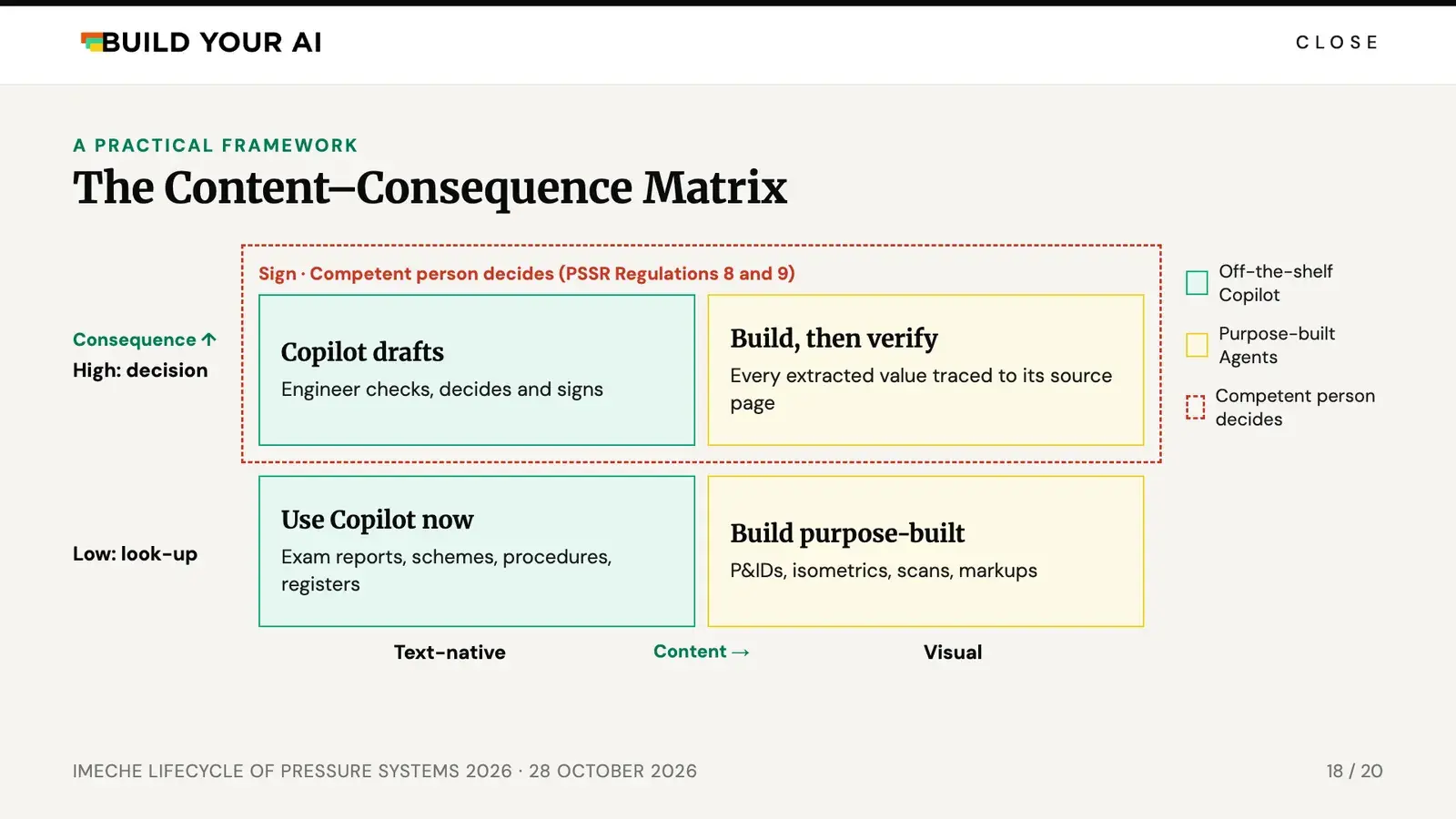
You already use a likelihood and consequence matrix for risk. This is the same idea for AI on your documents: what a task reads along the bottom, what rides on the answer up the side.
Bottom left: use Copilot now. Examination reports, schemes, procedures and registers. Start with tasks that are repetitive, rules-based and routine.
Bottom right: build purpose-built. P&IDs, isometrics, scans and markups. Off-the-shelf tools break here, so only build if the volume and the cost of a miss justify it.
Top row: the competent person decides. Copilot can draft, but the engineer checks, decides and signs. In the top right, every value a tool pulls from a drawing has to trace back to its source page, or the engineer has nothing to check it against.
Three things to do on Monday
None of these needs a budget line.
- Find out what Copilot can't see. Labelled files, scans, drawings and the EDMS. Ask IT whether SharePoint OCR is on, and check whether this content is allowed in Copilot at all.
- Trial one low-risk text task for a month. Examination report summaries, say. Measure the time saved after the engineer's check, not at the draft, or the business case won't hold up.
- Fix the register before you build. Tags, design limits, scheme references and due dates as fields. That pays off whatever tool you end up using.
Get the slides, cheat sheet and test pack
The full slides with sources, the four-page cheat sheet and the synthetic test pack, so you can run the same tests on your own Copilot.
Your download will be emailed to you along with relevant tips for AI adoption in engineering.
Questions people ask
Can Copilot read P&IDs?
Sometimes, on a clean upright sheet. In our test it read the PRV set pressures correctly upright, then reported 2.0 barg as 20 barg once the drawing was rotated 90 degrees. Microsoft documents no accuracy figure for drawing interpretation, so test it on your own drawings before relying on it.
Is it safe to put our pressure systems documents in Copilot?
That's a data classification question before it's an AI one. Check sensitivity labels, tenant settings and what your contracts allow. Bear in mind that in Copilot Studio, uploaded files marked Confidential or protected with a password return nothing, even when they look ready.
Why can't Copilot find text in our scanned reports and drawings?
Text inside scans and images isn't indexed in SharePoint unless IT turns on SharePoint OCR. It's a pay-as-you-go add-on and only processes files uploaded after it's enabled.
Would HSE accept an AI-drafted written scheme of examination?
PSSR cares who draws up or certifies the scheme, not what typed it. Under Regulation 8 a competent person must draw it up or certify it as suitable, and HSE's June 2026 policy statement says existing health and safety law applies whatever technology is used.
Should we build a custom AI tool for our drawings?
Usually not first. Get the controlled record and the asset register right, then decide based on how many documents you have, how much of it is visual and what a miss would cost.
About the speaker

Ali Parandeh
CEng MIMechE · CEO and Founder, Build Your AI
Ali Parandeh is a Chartered Engineer and AI software engineer. He started in systems engineering at AtkinsRéalis, working on signalling, RAMS models and HS2 station design, then moved into AI in rail at CrossTech and generative AI at ADSP. He is the author of Building Generative AI Services with FastAPI (O'Reilly, 2025) and is writing the Building Reliable AI Agents series for Manning. Through Build Your AI he helps engineering organisations in regulated sectors take AI from pilot to production.


If working out where Copilot fits with your pressure systems records is a live problem for your team, let's talk.
Sources
Law and guidance
- Pressure Systems Safety Regulations 2000, Regulations 8 and 9
- HSE, L122 Safety of pressure systems, Approved Code of Practice
- HSE, regulatory approach to AI, policy statement, 12 June 2026
- HSE, ThinkSHARP research on cognitive offloading in AI-assisted safety decisions
- Engineering Council and Royal Academy of Engineering, Statement of Ethical Principles, February 2026
- DNV-RP-0671, assurance of AI-enabled systems
Copilot and SharePoint
- Microsoft Learn, Copilot Studio unstructured data knowledge sources, August 2026
- Microsoft Learn, SharePoint OCR overview
- Microsoft Learn, Copilot document analysis FAQ
- Microsoft Q&A, practitioner reports on agents and tables
- Microsoft 365 roadmap, items RM550514 and RM559613
- Microsoft customer story, WSP, January 2026 (self-reported survey)
Research and cases
- Alimin and Schweidtmann, "ChatP&ID", arXiv 2603.22528, March 2026
- Mott MacDonald, REALM, May 2026 (firm-reported)
- PA Consulting, Sellafield client story
- GetReskilled, Reading P&ID Symbols guide (test drawing)